October 23rd, 2025
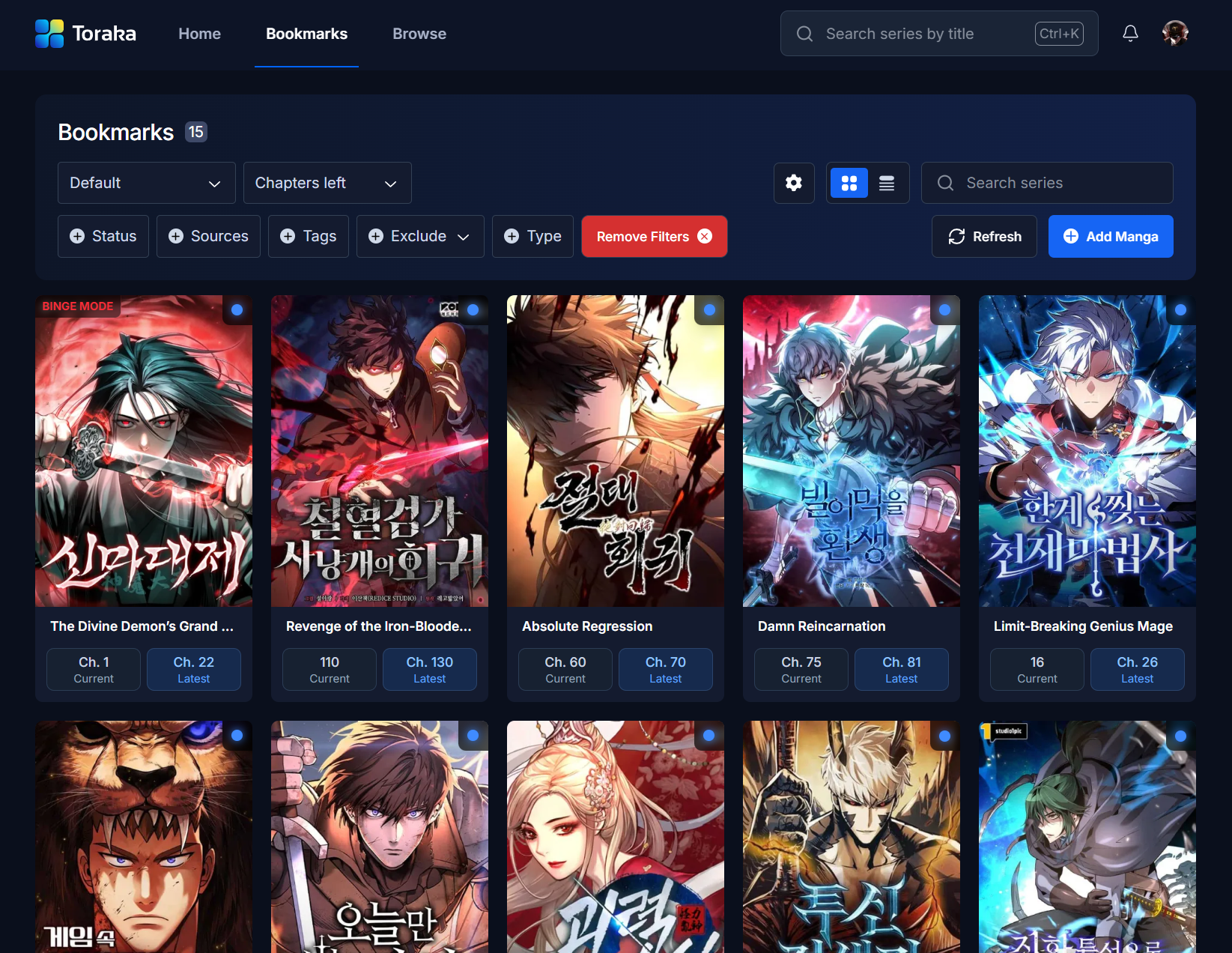
Toraka.com Revamp & New Features!
This release marks the beginning of a new chapter for Toraka, a complete platform overhaul featuring a full site redesign and a broad range of quality-of-life upgrades.
Our goal with this update was to make Toraka feel faster and more intuitive to use. We've made performance improvements, streamlined our interface, and every part of the platform has been re-examined to create a smoother reading and tracking experience.
This update is also the foundation for everything that comes next. Future updates will expand beyond bookmarks to introduce user profiles, reading history, and real-time chapter syncing with sources like Asura Scans, so your bookmarks on Toraka can automatically update as you read.
We’re very happy with the progress made in this changelog and are confident that with the planned upcoming features and continued improvements, Toraka will be far better than any alternative service.
Bookmarks v2
We’ve completely overhauled the bookmarks system to make tracking and managing your reading smoother, faster, and more flexible.
1. List View
You can now toggle between the classic grid layout and a new list view. The list view is optimized for faster scrolling and fitting more content on your screen, making it ideal for users with large reading lists.

2. Publication Status Filters
You can now exclude specific publication statuses (e.g., ongoing, completed, hiatus) from your bookmarks view, allowing you to focus only on the series you want to see.

3. Notes
Each bookmarked series now supports personal notes. Use this to write down reminders, favorite arcs, character details, or anything else you want to remember about a series.
You can also drop a link, and it will automatically become clickable.


4. Set Chapter to Latest
Quickly sync your bookmark to the latest released chapter with one click instead of having to edit it manually.

5. Bulk Edit Tools
You can now select multiple series and apply batch actions, such as:
Updating reading status
Updating custom tags
Deleting bookmarks


6. Custom Tags
Create and assign your own tags to series (e.g., “binge later”, “favorite”, “dropped”). Custom tags can be filtered, sorted, and added to series in bulk, giving you more control over your reading organization.

7. Binge Mode
Binge Mode lets you hide a series until it reaches a chapter count you set. While paused, the series is hidden from your bookmarks and notifications are muted, so you won’t see any updates until it’s ready for your binge session.

8. Mute Notifications
You can now mute notifications for specific bookmarks so they don’t appear in your updates list.

9. Report Series (Currently Disabled)
You can now report issues directly from the bookmarks page, whether it’s incorrect or missing data.

10. Custom Page Size
You can now change how many series appear per page, giving you better control over performance and visibility. This is ideal for users with large bookmark collections.

11. ‘Manual’ Source Support
For series without a linked source, we’ve added a ‘Manual’ source. When you click a chapter from this type of series, you’ll be redirected to a Google search result for that chapter, making it easier to track and read even series without a connected source.

12. Sort by Ascending & Descending
You can now toggle Ascending or Descending sorting for all available options. For example, you can sort by Recent Chapter or Last Read, and instantly reverse the order with a single click.
This gives you more control over how your bookmarks are displayed, and makes it easier to prioritize what you want to read next.

13. ‘Default’ Status Filter
A new Default option has been added to the Status filter, which combines Reading, Awaiting Updates, and Plan to Read, and will serve as the default status filter.

Homepage
The homepage has been completely refreshed, including a new menu bar for quicker navigation.
Improved Search: You can now open search instantly with
CTRL + Kon Windows orCMD + Kon MacOS.Search History: The last five results you clicked are automatically saved, making them easy to revisit.
Bookmark from Search: You can now bookmark series directly from search results.
Cleaner Navigation: A more streamlined and responsive layout enhances the overall experience.

Browse Page
The browse page is now less cluttered and offers more filtering options. It will also display the total number of chapters for each series without needing to open its series page.
Filter by Minimum Chapters: Set a minimum chapter count to only see series that match or exceed your preferred length.
Filter by Source: Narrow down your results to only show series from specific sources.
Improved Search: You can now search for series using mainstream languages or alternative names, and it will still show the series you’re looking for.
We’ll also be introducing Delisted Series in a future update, which allows users to bookmark series that exist in our database but don’t have a public series page because they violate our Terms of Service or don’t meet our safe content standards. This ensures you can still keep track of these titles privately, while we can keep the public catalog clean and compliant.

Series Page
The series page has now been fully redesigned, and you may notice the following updates being rolled out over the next month:
Image Highlights: Some series will feature curated highlight images for a more dynamic and immersive presentation.
Reviews: You can now read community reviews and share your own thoughts directly on the series page.
Block Series: A new block option lets you remove specific series entirely from your view for a cleaner, more personalized experience.

Install the App (PWA)
You can now install our site as an app directly on your desktop or mobile device. This makes it easier and faster to access the platform whenever you want, without relying on your browser bookmarks.
